Sunday, 3 July 2022

Shrinking Latency

Foreword

In the previous post we created a very elementary memory tester for the Arty A7 board to see if we more or less got the logic correct for writing and reading to memory.

When I wrote the memory tester, I have added quite a bit of padding between DDR commands, just to avoid violating some DDR timing parameters. The purpose of this exercise was just to get the memory tester working, and not to worry at that point in time of getting the most efficient time possible. The old saying of when eating an elephant, you do so one bite at a time. πŸ˜€

In this post we will revisit timings for our elementary memory tester, and see where we can remove any wasted clock cycles. The ultimate goal is to be able to access memory at a rate of at least 7MHz, which will be sufficient to emulate an Amiga core.

Reducing initial latency

Let us see if we can reduce initial latency. That is the latency from the moment the Memory Tester asserts a command, until the time when DDR RAM receives the first command for fulfilling this request. This is all illustrated with the following hand drawn diagram:


In this diagram every division indicated has a period of 1.5ns and we show a couple of clock signals. Let us start by having a look at the frequencies of these clock signals:

  • Memtester has a frequency of 20MHz, and I am not showing a complete cycle of it.
  • Oserdes Out has a period of 2 divisions = 3ns. This equals a frequency of 333MHz. This is the signal driving the commands out to the DDR RAM.
  • Oserdes Load has a period of 8 divisions = 12ns. This equals a frequency of 83MHz. This clock signal is used to load the OSERDES block with 4 bits worth of data at a time. 
  • As you can see from the diagram, Mclk has exactly the same frequency as Oserdes Load, but is shifted 45 degrees.
Let us know look at the initial flow of events when the Mem Tester asserts a command. The Mem Tester asserts a command at point A.

We capture this command from the Mem Tester at point B. You might remember from the previous post, that we store this captured command in a register called test_cmd.

Out test_cmd register is hooked up to the inputs of Oserdes blocks, which loads values from test_cmd on the rising edge of the Oserdes load clock.

From the diagram you will see that point B will happen a small amount of time after a rising edge of Oserdes Load. This means that Oserdes blocks will not capture the data of test_cmd straight away, and will only happen at point C.

With the way Oserdes blocks work, it will not start out putting the 4-bit sequency to DDR RAM at point C, but rather at the following rising edge of the clock of Oserdes load.

As you can see quite a bit of time is wasted from the time a command is asserted by the mem tester, until the time the first command is issued to DDR RAM, resulting in reduced throughput.

There is a number of ways we can reduce this initial latency. For starters, quite a bit of time is wasted by first storing a value into a register, making this data only available to the rest of the system at the following clock cycle.

For the initial command to the DDR spawning from the mem tester, we can bypass the test-cmd register and feed it directly to the Oserdes blocks. We can do this as follows:

...
    assign result_cmd = (state == WAIT_CMD && cmd_valid && !refresh_out) 
           ? {1'b0, 8'b0, cmd_address[15:10], 1'b0, 16'h21fd} : test_cmd;
...
    phy_cmd #(
      ...
    ) phy_cmd_i (
      ...
        .phy_cmd_word        (result_cmd),
	  ...
    );
...
So, if we are in the state WAIT_CMD, the mem tester indicates the command is valid, and it is not a refresh command, we don't use test_cmd, but build up a row activate command on the fly. With this setup the oserdes components will load on the first oserdes load-clock edge following the mem tester clock edge, and will basically start outputting commands to DDR RAM at point C in the diagram. In effect we have shaved off a full oserdes load-clock cycle of latency.

The period between the rising edge of the mem tester-clock cycle and the following oserdes load clock-cycle is 1.5ns. During testing I have found that this period doesn't allow for proper settling of all bits of the command from the mem tester.

To make everything work ok, I had to double this period between the two rising edges to 3ns. To accomplish this, I had to adjust the phases of the clock that the MMCM block provides. The adjustments of the notable clocks are as follows:
  • Oserdes data load: From 45 degrees to 90 degrees.
  • Serial data out: From 180 degrees to 0 degrees.
  • Mclk: From 90 degrees to 135 degrees.
So, in effect all the clocks need to shift by a period of 1.5ns with the exception of the mem tester clock.

Changing command slots

As mentioned previously, the Oserdes components for outputting commands to DDR, receives 4 bits of data at a time. At any one point in time only one of these 4 bits will contain a command. The other three bits will be part of NOP commands.

At this point in time we don't have much flexibility at which of the four time slots a command can be issued. If we decide, for instance, that slot 2 should be used for commands, then every command we issue should be issued at slot 2, i.e. we cannot alternate between different slots between commands.

This incapability of alternating between different slots can also cause unnecessary latency.

Let us take an example.  The DDR RAM on the Arty A7 has a minimum latency of 5 clock cycles between commands. Let us assume we have decided to use the first slot as the command slot and we want to give a row activate command followed by a column read command. Let us quickly visualise the time slots:

1000 1000

Here we can see that issuing an Activate command in the first four time slots and then the read column command in the next four timeslots is not going to work for us. In this setup there is 4 cycles latency between the commands instead of the required 5. Because we cannot alternate between time slots, we will need to issue the commands like this:

1000 0000 1000

We can clearly see that we are wasting 4 cycles just because we cannot alternate between time slots, in order to guarantee a minimum of 5 cycles between commands.

For us to implement alternating between different ime slots, we need to look inside the file cmd_addr.v. You can find within the Elphel project in the path memctrl/phy/cmd_addr.v. WIthin this module we need to add the following input port:

input                  [1:0] cmd_slot,
This indicates at which slot number the given command should be triggered. Let us look at the write enable signal as an example on how to use this input port:

// we
    cmda_single #(
         .IODELAY_GRP(IODELAY_GRP),
         .IOSTANDARD(IOSTANDARD),
         .SLEW(SLEW),
         .REFCLK_FREQUENCY(REFCLK_FREQUENCY),
         .HIGH_PERFORMANCE_MODE(HIGH_PERFORMANCE_MODE)
    ) cmda_we_i (
    .dq(ddr3_we),
    .clk(clk),
    .clk_div(clk_div),
    .rst(rst),
    .dly_data(dly_data_r[7:0]),
    .din({cmd_slot == 0 ? {1'b1, 1'b1, 1'b1, in_we_r[1]} :
          cmd_slot == 1 ? {1'b1, 1'b1, in_we_r[1], 1'b1} :
          cmd_slot == 2 ? {1'b1, in_we_r[1], 1'b1, 1'b1} :  
          {in_we_r[1], 1'b1, 1'b1, 1'b1}}),
    .tin(in_tri_r), 
    .set_delay(set_r),
    .ld_delay(ld_dly_cmd[3]));
As can be seen here at port din we place the signal in a different position for each value of cmd_slot.

We need to repeat the above for each of the command signals. For the address and bank number signals we can just repeat the value for each slot, taking address as an example:

generate
    genvar i;
    for (i=0; i<ADDRESS_NUMBER; i=i+1) begin: addr_block
//       assign decode_addr[i]=(ld_dly_addr[4:0] == i)?1'b1:1'b0;
    cmda_single #(
         .IODELAY_GRP(IODELAY_GRP),
         .IOSTANDARD(IOSTANDARD),
         .SLEW(SLEW),
         .REFCLK_FREQUENCY(REFCLK_FREQUENCY),
         .HIGH_PERFORMANCE_MODE(HIGH_PERFORMANCE_MODE)
    ) cmda_addr_i (
    .dq(ddr3_a[i]),               // I/O pad (appears on the output 1/2 clk_div earlier, than DDR data)
    .clk(clk),          // free-running system clock, same frequency as iclk (shared for R/W)
    .clk_div(clk_div),      // free-running half clk frequency, front aligned to clk (shared for R/W)
    .rst(rst),
    .dly_data(dly_data_r[7:0]),     // delay value (3 LSB - fine delay)
    .din({4{ in_a_r[ADDRESS_NUMBER+i]}}),      // parallel data to be sent out
//    .tin(in_tri_r[1:0]),          // tristate for data out (sent out earlier than data!) 
    .tin(in_tri_r),          // tristate for data out (sent out earlier than data!) 
    .set_delay(set_r),             // clk_div synchronous load odelay value from dly_data
    .ld_delay(ld_dly_addr[i])      // clk_div synchronous set odealy value from loaded
);       
    end
endgenerate

Putting everything together

We are now ready to adjust our main state machine within mcontr_sequencer.v. We start with the PREPARE_CMD and WAIT_CMD states:

...
              PREPARE_CMD: begin
                  test_cmd <= 32'h000001ff;
                  cmd_slot <= 0;
                  state <= WAIT_CMD;
...
              end
              WAIT_CMD: begin
                  if (cmd_valid)
                  begin
                      if (refresh_out)
                      begin
                          state <= REFRESH_1;
                          cmd_status <= 2; 
                      end else begin
                          state <= STATE_PREA;
                          test_cmd <= {1'b0, 4'b0, cmd_address[9:0], 1'b0, 4'h1, 
                      (write_out ? 2'b11 : 2'b00), 10'h1fd};
                          cmd_slot <= 1;  
                          data_in <= cmd_data_out;
                          do_write <= write_out;
                          cmd_status <= 2;
                      end
                  end
              end
...
In PREPARE_CMD we ensure that all commands will be issued at the first timeslot.

You will remember that earlier on we defined the wire result_cmd that will pass the ACTIVATE command beforehand to DDR when the Mem tester have asserted a command. So within the WAIT_CMD selecter we can go ahead and issue a DDR Read/Write command, or a Refresh command if desired.

For the rest of the states, we remove unnecessary waits, which results in the following:

             
             STATE_PREA: begin
                  state <= WAIT_WRITE_RECOVERY;
                  dq_tri <= do_write ? 0 : 15;
                  cmd_slot <= 0;
                  test_cmd <= do_write ? 32'h000005ff : 32'h000001ff;                 
              end
              WAIT_WRITE_RECOVERY: begin
                  test_cmd <= 32'h000001ff;
                  state <= PRECHARGE_AFTER_WRITE;
              end
              PRECHARGE_AFTER_WRITE: begin
                  do_capture <= 1;
                  state <= POST_READ_1;
                  cmd_slot <= 3;
                  test_cmd <= 32'h000029fd;
              end

              POST_READ_1: begin
                  state <= PREPARE_CMD;
                  test_cmd <= 32'h000001ff;
              end
Let us quickly go through this code. In STATE_PREA we wait for the read/write cycle to complete, and keep the ODT signal asserted during this time if it is a write.

After a read/write cycle is complete we need to close the open row in preparation for the next read/write command, by means of a PRECHARGE command. However, with DDR RAM you cannot issue an PRECHARGE command straight away, but need to wait for a period of time after a read/write cycle has completed. This time period is called Write Recovery, and on the Arty A7 this is 5 clock cycles.

Test Results

Let us see what happens in practice. The following simulation waveform shows what happens during a read:


On this waveform I have indicated points A, B, C, D and E:
  • Point A is the clock signal for our Memory Tester. Originally this frequency was 20MHz, but during experimentation, I have found that 20MHz is a tight fit. I have lowered the frequency to 16.7MHz instead. Here the Memory Tester issues the command at the first rising edge and data is available at the following rising edge.
  • At point B we issue a row Activate command.
  • At point C we issue a column read command.
  • At point D we issue the precharge command.
  • Point E indicates the point when we receive data from the data_out port and when this value is captured by the cap_value port.
As we see on point E the data is captured after the second riging edge of the Mem Tester clock, but we require it to be captured before the second rising edge. We will tackle this in the next post.

In Summary

In this post we have attempted to reduce latency in our Memory controller. We managed to reduce the time from the memory tester issues a memory command, till the time a physical command is issued to DDR RAM.

An issue that we still need to resolve, is making read data available before the second rising edge of the second rising Mem Tester clock.

Until next time!

Thursday, 26 May 2022

Starting with a memory tester on the Arty

Foreword

In the previous post we managed to write a value to a memory location, and read the same value back.

In this post we will create a very simple memory tester, just to stress test the memory a tiny bit and see if there is some obvious setup and hold hold timing violations, resulting in data corruption.

This is kind of habit I have grown into, since your design might operate ok with a few clock cycles, but you might experience a weird glitch after a couple of thousands of clock cycles, due to a setup and hold violation. So, it is always good to stress test bits of your design as soon as possible, to avoid a lot of rework.

For this memory controller I will covering in this post, I will be writing test data to a couple of rows to DDR RAM, wait for about 20 seconds, and see if I can read back the correct value from a particular memory location.

Obviously, for this test I will also need to implement some refresh logic, so that the data doesn't leak away from the tiny capacitors in the DDR RAM during the 20 seconds of waiting. 

Abstracting the memory tester from Technical details

The Memory tester we will be developing in this post issues a series of write and read commands. In the future this memory tester will be eventually replaced by the Amiga core, which will be issuing this commands.

The Amiga core doesn't understand the technical details of DDR memory, like splitting an address into a separate row address and column address. The Amiga core also doesn't know that for any memory read/write command you first need to activate row and afterwards pre-charge it.

For all these reasons, we need to abstract the technical details of DDR memory from our memory tester.

The abstracted interface for our Memory tester looks as follows:

    
module mem_tester (
    output reg select,
    output reg write,
    output [15:0] address_out,
    );
	
endmodule
Address_out is a linear address. Outside this module it will be converted to row and column addresses. For now, I am only going to make the with of this output 16 bits.

The Memory tester will use the select output to assert a command and indicate if it is a read/write command with the write output.

We need to add some more ports to our memory tester:

module mem_tester(
...
    input clk,
    input [2:0] cmd_status,
    output reg refresh = 0,
    output wire [127:0] data_out,
    input [127:0] data_in
...
    );
	
endmodule
For our input clock, I want to use a frequency of 20MHz, which is close to the frequency used by the Amiga core.

I can hear a couple of screams at this point: "Cross clock domains!". Indeed, cross clock domains is always a pain to work with πŸ˜€.

However, in the past couple of months I have discovered when working with a Mixed Mode Clock Manager (MMCM) in Xilinx FPGA's, working with cross domain clocks is not so bad. With a MMCM you can align the rising edges of different output clocks. Provided that the frequency of the slower clock is a multiple of the faster clock, these edges will always line up.

The next port, cmd_status, will indicate for our memory tester when memory is ready to accept the next command.

You will note that I also have a refresh output port, indicating that our Memory tester is also responsible for performing memory refresh. This goes a bit against our goal of abstracting the technical details off DDR RAM, but I found it difficult to orchestrate a refresh from the outside with the different clock domain.

 Finally, we are sending and receiving bits of 128 bits at a time. This is because the DDR RAM works with 8 bursts at a time. Again, this is a bit of a mismatch with the Amiga core, which works with only 16 bits at a time, but we will handle it in future when we get there.

Coding the Memory Tester

With the ports defined for our memory tester, let us start with some code. We start with a state machine:

    always @(posedge clk)
    begin
        case (state)
              0: begin
                      if (cmd_status == 1)
                      begin
                          if (refresh_underflow)
                          begin
                            refresh <= 1;
                            select <= 1;
                            state <= 2;
                          end else if (address[15:14] != 2'b11)
                          begin
                            write <= 1;
                            select <= 1;
                            state <= 2;
                          end else if (wait_for_read == 0)
                          begin
                            write <= 0;
                            select <= 1;
                            state <= 2;
                          end
                      end 
                 end
              2: begin
                     select <= 0;
                     refresh <= 0;
                     state <= wait_for_read == 0 ? 3 : 0;
                 end
        endcase
    end
State 0 is an idle state, where we wait for the memory to become ready. When the memory controller is ready, we first need to check if the memory is due for a refresh.

The address register keeps track of which address we need to write test data to. Once the top two MSB's of the address register have approached 1's, we are finished with writing. From this point onwards we wait for the signal of wait_for_read to signal that we need to read data from a particular location.

We need state 2 to immediately unassert  the command we issued in the previous state. We also want to stop issuing commands once we have issued a read command by assigning state to 3.

Next, let us have a look at other snippets of code on which our state machine depends. First, the refresh logic:

    always @(posedge clk)
    begin
        if (refresh_counter == 0)
        begin
            refresh_underflow <= 1;
        end else if (refresh)
            refresh_underflow <= 0;
        begin
        end
    end
    
    always @(posedge clk)
    begin
        if (refresh_counter > 0)
        begin
            refresh_counter <= refresh_counter - 1;
        end else
        begin
            refresh_counter <= 120;
        end        
    end
Refresh counter continuously countdown from 120 to zero. With our module clocking at 20MHz this means this counter underflows every 6 microseconds, which is in line with the specs of our DDR RAM stating a refresh command should be issued every 7 microseconds.

The refresh_counter remember that a refresh needs to happen and gets cleared as soon as the refresh command was issued.

Next, let us look at the code that keeps track of the address to which we need to write to:

    always @(posedge clk)
    begin
        if (state == 2 && !refresh)
        begin
            address <= address + 8;
        end
    end
We advance the address to the next address once we are finished with a write command. We also adnace by 8 instead 1 because of bursty nature of DDR RAM. We also don't want to advance the address if the previous command was a refresh.

Let us have a look at data generation for the writes:

...
    assign data_out = {data_counter, 3'b000,
                       data_counter, 3'b001,
                       data_counter, 3'b010,
                       data_counter, 3'b011,
                       data_counter, 3'b100,
                       data_counter, 3'b101,
                       data_counter, 3'b110,
                       data_counter, 3'b111};
...					   
    always @(posedge clk)
    begin
        if (state == 2 && !refresh)
        begin
            data_counter <= data_counter + 1;
        end
    end
...
Here we create data for 8 bursts at a time.

Let us next create the logic where we wait for the read:

...
    reg [31:0] wait_for_read = 400000000;
...	
	always @(posedge clk)
    begin
        if (wait_for_read > 0)
        begin
            wait_for_read <= wait_for_read - 1;
        end
    end
...
This snippet will wait for about 20 seconds before doing a read. The cycle which writes all the test data will complete long before then, and will continue to refresh the DDR RAM continuously until it is time to do the read.

Adding the Memory controller to the existing design

Let us now add our Memory Tester to our existing design. From my previous post, you will remember that I have implemented our logic as another state machine in the module, mcontr_sequencer. Within this module we will also place in instance of memory tester, as follows:

mem_tester m2(
    .clk(memtest_out),
    .cmd_status(cmd_status),
    .select(cmd_valid),
    .write(write_out),
    .address_out(cmd_address),
    .refresh(refresh_out),
    .data_out(cmd_data_out),
    .data_in()
    );
We need to change the code a bit in our state machine living within the module mcontr_sequencer a bit so that it work with our memory tester.

The first change is as follows:

    always @(posedge mclk)
    begin
        if (start_init)
        begin
            case (state)
			...
			... initilise the memory ...
			...
              PREPARE_CMD: begin
                  test_cmd <= 32'h000001ff;
                  do_capture <= 0;
                  state <= WAIT_CMD;
                  cmd_status <= 1;
              end
              WAIT_CMD: begin
                  if (cmd_valid)
                  begin
                      if (refresh_out)
                      begin
                          state <= REFRESH_0;
                          cmd_status <= 2; 
                      end else begin
                          state <= STATE_PREA;
                          test_cmd <= {1'b0, 8'b0, cmd_address[15:10], 1'b0, 16'h21fd};
                          data_in <= cmd_data_out;
                          column_address <= cmd_address[9:0];
                          do_write <= write_out;
                          cmd_status <= 2;
                      end
                  end
              end			
			  ...
            endcase
        end
    end
We get into the state PREPARE_CMD, right after the memory was initialised, which we have covered in a previous post. Within the state PREPARE_CMD we set cmd_status to 1. This signals our memory tester that it is free to submit a command.

We then wait in the state WAIT_CMD until the memory tester has given us a command. We will cover the refresh command a bit later.

When we have received a read/write command, the first thing we need to do is to activate the row in question. You can see from the snippet above that we get the row address by looking at bits 15:10 of the cmd_address. The lower bits of the address bits 9:0 is the column address, and we save this for later use.

In the next state we get the dq bus ready for either reading or writing, and in subsequent states we wait for the ACTIVATE phase of the DDR RAM to complete:

              ...
              STATE_PREA: begin
                  state <= STATE_WAIT_READ_PATTERN_0;
                  dq_tri = do_write ? 0 : 15;
                  test_cmd <= 32'h000001ff;                  
              end
			  .... wait until activate is complete ...
Once activation is complete, we can issue the command for reading/writing a column:

              ISSUE_CMD: begin
                  state <= ASSERT_ODT;
                  test_cmd <= {1'b0, 4'b0, column_address, 1'b0, 4'h1, 
                      (do_write ? 2'b11 : 2'b00), 10'h1fd};
              end

              ASSERT_ODT: begin
                  test_cmd <= do_write ? 32'h000005ff : 32'h000001ff;
                  state <= WAIT_CMD_FINISHED;
              end
With writes we need to assert the ODT line, which we do in the ASSERT_ODT state.

Finally after completing a read/write, we need to precharge the row, which I am not going to show here.

In our state machine we still need to serve the Refresh command. Apart from assigning a value to test_cmd to trigger the Refresh command, we also need to honour the timing period tRFC after issuing the command, which is 160ns for the DDR RAM chip we use on the Arty A7 board. 

We implement this delay also on our state machine, so our memory tester will only need to issue the refresh command and don't need to worry about timing the tRFC delay. Out state machine implementing the refresh command will look like this:

...
reg                   [3:0] refresh_wait = 14;
...
             REFRESH_0: begin
                  test_cmd <= 32'h000031ff;
                  state <= REFRESH_1;
              end

              REFRESH_1: begin
                  test_cmd <= 32'h000001ff;
                  if (refresh_wait > 0)
                  begin
                      refresh_wait <= refresh_wait - 1;
                  end else
                  begin
                      refresh_wait <= 14;
                  end
                  if (refresh_wait == 0)
                  begin
                      state <= PREPARE_CMD
                  end
              end

Since our state machine is operating in the 83MHz domain, 14 cycles gives us 168ns, which is in line with tRFC.

Test Results

Running our design on the FPGA returned the results I expected when I read back a test value from memory after 20 seconds.

For the moment, I have nothing else to report back on πŸ˜„

In Summary

In this post we have implemented a very simple memory tester where we write a volume of data to memory, wait 20 seconds and read a test value back.

In the next post we will be continue to chip away at our memory controller.

On thing I am aware of I should give attention to in our memory controller is to reduce latency so that we can easily operate at 7MHz, which is the memory bandwidth the Amiga core requires. We will give attention to that in the next post.

Till next time!

Monday, 25 April 2022

Writing and reading to Arty RAM

Foreword

In the previous post we played a bit with read levelling on the Arty A7.

I also came up with the theory that you don't really need to do write or read levelling on the Arty A7. This board only contains a single RAM chip and is fairly close to the FPGA, so from the looks of it one would not need to account for variable clock skew.

If this theory would proof to be correct throughout this series, our design will remain relatively simple.

In this post we attempt to write a value to the RAM of the Arty, and see if we can read the same value back.

If we can achieve this step, it will be a huge step in creating our custom memory controller.

As with my previous couple of posts, I will be building on the 10393 Elphel Memory controller, where the source code is available here.

Overview of RAM commands for reading and writing

Let us start off by looking at the commands to do a read and a write to RAM.

Before we do anything, it is important that the row gets activated on which we want to work. This is done by bringing the RAS signal low and specifying the row address. Before issuing the next command, one needs to wait for a couple of clock cycles. On the Arty A7, this waiting period is 5 clock cycles.

With the row activated, reading and writing commands can now be issues to that row.

To do a write, the CAS signal needs to be brought down, as well as the WE signal. The column address to which we want to write also needs to be supplied at the same time.

Once the write command is supplied to the RAM, the data needs to be provided on the DQ pins. However, the data cannot be provided straight away and one needs to wait for 5 clock cycles before providing it.

In our case, after we have performed  write, we want to see if we can read the same data back. For a read command the CAS needs to be pulled down once again, but we leave WE high. We also need to specify the same address as we did previously for the write.

After waiting again for 5 clock cycles, the data will be available on the DQ pins.

Just a note about the data written or read to and from the DQ pins. During a read or write operation, eight 16-bit words is transferred at a time. These eight words is transferred over a period of 4 clock cycles, transferring a word at both rising and falling clock transitions.

ISERDESE2 and OSERDES2 revisited

As you might have guest, we will be using ISERDESE2 and OSERDESE2 components for capturing/writing the eight words on the DQ pins.

From the previous post we have seen that these components are serial-parallel/parallel-serial converters, allowing data on DQ pins to work at a speed of 333MHz, while allowing the rest of the FPGA to operate at a more convenient 83MHz.

Since my last post, I discovered a caveat with ISERDESE2 and OSERDESE2 components. With ODERDESE2 you can indeed specify 8 bits at a time, which makes our 83MHz/333MHz sum work out. 

However, I discovered that ISERDESE2 can only accept 4 bits data from the DQ pins at a time, so suddenly our 83MHz/333Mhz sum doesn't work out anymore. We would need to clock the ISERDESE2 at 167MHz to ensure we offload the captured bits in time each time.

I don't feel comfortable running everything in the FPGA at 167MHz, so I will add my shift register in the design that will shift in 4bits at a time and output eight bits. The shift register will therefore operate at 167MHz, and the rest of the design can operate at 83MHz.

The Command State Machine

Up to now I have been making use of a state machine for issuing the series of commands for initialising the RAM, and doing read and write levelling. I will be using the same state machine in this post for testing the read and write operation.

I haven't given much detail of this state machine, so I will do so in this section.

I have implemented the state machine in the file memctrl/phy/mcontr_sequencer.v of the Elphel 10393 memory controller.

Each command issued by the state machine is basically a 32 bit number, where the layout of the important bits are as follows:

  • bits 30-17: address
  • bits 16-14: bank
  • bit 13: RAS
  • bit 12: CAS
  • bit 11: Write Enable
  • bit 10: ODT
  • bit 9: CKE
Each bit of this command will ultimately end up at an OSERDESE2 component. In DDR RAM these bits only clock bits at the rising edge, so for these OSERDESE2 components you only need to specify 4 bits at a time instead of 8.

These 4 bits we supply to a OSERDESE2 component corresponds to 4 timeslots and one of these timeslots will be our command bit.

At this point the obvious question will arise on which timeslot should be used as the command bit. This will become apparent a bit later.

Let us get back to our state machine. To perform an Activate, we do the following snippet:

    always @(posedge mclk)
    begin
        if (start_init)
        begin
            case (state)
			  ...
			  ... initialise RAM
			  ...
              STATE_ACTIVATE: begin
                  state <= STATE_WAIT_ACTIVATE;
                  //Do activate
                  test_cmd <= 32'h000021fd;
                  dq_tri = 0;
                  data_in <= 128'h112233005566778899aabbccddeeff44;
              end

              STATE_WAIT_ACTIVATE: begin
                  test_cmd <= 32'h000001ff;
                  state <= STATE_WAIT_STATE_1;
              end

        end
A couple of things is happening here. First we send the command for doing an activate, which is represented by the value 32'h000021fd. A command should only be signalled for one clock cycle, after which the RAS, CAS and WE signals should be de-asserted. It is for this reason we set the command to 32'h000001ff at the next clock cycle.

You will also realise that I am setting dq_tri to zero. This sets the DQ tristate buffers to output mode so that we perform writing at a later stage.

Also, during STATE_ACTIVATE, data_in gets assigned a value. This in effect is 8 16-bit words wrapped in a 128-bit value, which we want to write to memory. This data is supplied to the OSERDESE2 components for the DQ pins.

Once we have set data_in with this value, the OSERDESE2 components for the DQ pins, will continuously output these 8 values.

After we have waited for at least 5 cycles for ACTIVATE to complete, we can issue a write command and then  a read command:

              READ_TEST: begin
                  state <= WRITE_DELAY_0;
                  //Column write
                  test_cmd <= 32'h00081dfd;
              end
			  
              WRITE_DELAY_0: begin
                  test_cmd <= 32'h000005ff;
                  state <= WRITE_DELAY_1;
              end
              ...
	      ...Wait 5 clock cycles
       	      ...

              DO_READ: begin
                  state <= PAUSE_AFTER_READ;
                  //Column read
                  dq_tri <= 15;
                  test_cmd <= 32'h000011fd;
              end

              PAUSE_AFTER_READ: begin
                  state <= PAUSE_AFTER_READ;
                  test_cmd <= 32'h000001ff;
              end
You will notice that after issuing the WRITE command, we are issuing the value 32'h000005ff instead  of 32'h000001ff. The reason for this is because the ODT bit needs to be asserted during a write.

Now, after 5 clock cycles after issuing the WRITE command the RAM will read data from the DQ pins and use this to write to memory. Previously we have did setup the OSERDESE2 components to continuously write out 8 values. The RAM will pick up these values.

After the write command is complete, we issue a read command. Here we should note that dq_tri is set as such that the DQ tristate buffer is prepared for reading. The RAM chip will provide the requested data after 5 clock cycles.

The ISERDESE2 components for the DQ pins will capture the requested read data and output it in groups of 4. It is important that we latch this data to a register when it becomes available, otherwise the data will be gone after 4 more clock cycles.

We will have a look at latching this data in the next section. 

Latching read data

Apart from the need for latching, as described in the previous section, we also need latching for solving the issue where ISERDESE2 only outputs for 4 bits instead of 8, which is required so that our design can clock at the slower 83MHz, instead of 167MHz.

So, let us start to address the ISERDESE2 problem. The file in question is wrap/iserdes_mem.v of the Elphel 10393 memory controller. This is used by memctrl/phy/dq_single.v.

My instance of IDESERDESE2 in iserdes_mem.v looks like this:

...
 parameter IOBDELAY = "IBUF",
... 
	 ISERDESE2 #(
         .DATA_RATE                  ("DDR"),
         .DATA_WIDTH                 (4),
         .DYN_CLKDIV_INV_EN          (DYN_CLKDIV_INV_EN),
         .DYN_CLK_INV_EN             ("FALSE"),
         .INIT_Q1                    (1'b0),
         .INIT_Q2                    (1'b0),
         .INIT_Q3                    (1'b0),
         .INIT_Q4                    (1'b0),
         
         .INTERFACE_TYPE             ("MEMORY"),
         .NUM_CE                     (1),
         .IOBDELAY                   (IOBDELAY),
         
         .OFB_USED                   ("FALSE"),
         .SERDES_MODE                ("MASTER"),
         .SRVAL_Q1                   (1'b0),
         .SRVAL_Q2                   (1'b0),
         .SRVAL_Q3                   (1'b0),
         .SRVAL_Q4                   (1'b0)
         
         )
         iserdes_i
         (
         .O                          (comb_out),
         .Q1                         (iserdes_out[3]),
         .Q2                         (iserdes_out[2]),
         .Q3                         (iserdes_out[1]),
         .Q4                         (iserdes_out[0]),
         .SHIFTOUT1                  (),
         .SHIFTOUT2                  (),
         .BITSLIP                    (1'b0),
         .CE1                        (1'b1),
         .CE2                        (1'b1),
         .CLK                        (iclk),
         .CLKB                       (!iclk),
         .CLKDIVP                    (), // used with phasers, source-sync
         .CLKDIV                     (oclk_div),
         .DDLY                       (ddly),
         .D                          (d_direct), // direct connection to IOB bypassing idelay
         .DYNCLKDIVSEL               (inv_clk_div),
         .DYNCLKSEL                  (1'b0),
         .OCLK                       (oclk),
         .OCLKB                      (!oclk),
         .OFB                        (),
         .RST                        (rst),
         .SHIFTIN1                   (1'b0),
         .SHIFTIN2                   (1'b0)
         );

One particular change here, is that I am using the value "IBUF" for the parameter IOBDELAY. This is because I want to use the direct input, e.g. D, instead of the delayed version, DDLY. We are using our own fixed delays.

Now, in order to aggregate these 4 bits to 8 bits, we do the following:

 ...
 output [7:0] dout,
 ...
 always @(negedge oclk_div)
 begin
   dout_le <= {dout_le[3:0], iserdes_out};
 end
 ...
oclk_div is a 167MHz clock signal. With this snippet of code we will get 8 bits of data every second 167MHz clock cycle.

We now need to capture these 8 bits of data within our state machine. In the state machine we need to signal our design when to capture the data:

...
... Some delay
...
              POST_READ: begin
                  do_capture <= 1;
                  state <= POST_READ_1;
              end

              POST_READ_1: begin
                  do_capture <= 0;
                  state <= POST_READ_6;
              end
...
Directly after we have set do_capture to 1, we set it 0, so that the captured value is not overwritten. I have determine the right moment to set do_capture by experimentation in the Verilog simulator.

We use do_capture as follows:

    always @(negedge mclk)
    begin
        if (do_capture)
        begin
            cap_value <= data_out;
        end
    end

Test Results

Let us have a look at simulation waveforms for our design:


The signal ddr3_dq is the read data that comes back from DDR memory.

The data_out signal is the output from the DQ ISERDESE2 components. The bits are rearranged. The first 64 bits contains the upper byte of very burst, and the last 64 bits contains the  lower byte of every burst.

If we split the last data_out value into two pieces, we get:
  • xxxxxxxx 5577xxxx
  • xxxxxxxx 6688xxxx
You will see that each line starts with 8 x's. This is because only 4 bursts is captured at that point in time. When the next 4 bursts is captured, these 8 x's will be replaced by 5577xxxx and 6688xxxx respectively, and the old position of these two data elements will be replaced with the freshly captured 4 bits of data.

One thing that might look strange, is that both 5577 and 6688 is followed by 4 x's. This is because the ISERDESE2 components started to captured the 4 bits of data one cycle too early. We can fix this by altering the timeslot at which commands are issued.

The RAM commands gets issues within the file memctrl/phy/cmd_addr.v. I have made quite a bit of changes to this file myself. Let us have a look at this file which handles the we signal:

// we
    cmda_single #(
         .IODELAY_GRP(IODELAY_GRP),
         .IOSTANDARD(IOSTANDARD),
         .SLEW(SLEW),
         .REFCLK_FREQUENCY(REFCLK_FREQUENCY),
         .HIGH_PERFORMANCE_MODE(HIGH_PERFORMANCE_MODE)
    ) cmda_we_i (
    .dq(ddr3_we),
    .clk(clk),
    .clk_div(clk_div),
    .rst(rst),
    .dly_data(dly_data_r[7:0]),
    .din({1'b1, in_we_r[0], in_we_r[1], 1'b1}),
    .tin(in_tri_r), 
    .set_delay(set_r),
    .ld_delay(ld_dly_cmd[3]));
In my version of the file, din accepts 4 bits, whereas the original version only accepts two bits.

Now, the problem was that we start reading too early by one clock cycle, so if we issue the commands one clock cycle earlier, the problem will be solved. To do this, we change the din assignment as follows:

  • .din({in_we_r[0], in_we_r[1], 1'b1, 1'b1})
So, here we moved the in_we_r bits to the beginning.

With this change the simulation looks better:


There is just one thing I would like to mention. When running this on the actual FPGA, I have found that the result might differ by one clock cycle from the simulation.

In Summary

In this post we did a simple test of writing a value to ARTY RAM and trying to read the same value back.

I managed to succeed in  getting this design to run on both the simulation and running it on the FPGA.

In the next post I will try and create a memory tester from what we have learned so far. This will give us an opportunity to stress test our implementation for writing and reading to memory.

Till next time! 


Thursday, 24 March 2022

Read Levelling on the Arty A7

Foreword

In the previous post we had a look at write levelling. Write levelling is required on DDR3 because control signals to different memory chips are daisy chained. This means that the control signals travel different distances to different memory chips, which at high frequencies can lead to significant clock skew.

In DDR3 we try to compensate for this clock skew, by delaying the data strobe signal for each byte lane by a specific amount during reading and writing.

The process of determining the amount of delay required for the strobe signals is called write levelling and read levelling.

In this post we will be covering read levelling, still basing our design heavily on the Elphel Memory controller of the 10393.

Simplifying the plot

The more I read about read and write-levelling, the more I am convinced that it is a bit of a overkill to run these processes every time when you power up an Arty A7.

As I mentioned previously, these levelling processes is to account for the difference in distances the control signals need to travel to different memory chips.

However, the Arty A7 contains just one memory chip, and not several. With just that assumption alone, one doesn't need to worry about clock skew among different memory chips.

One might also argue, even though we only have one memory chip, it can be potentially far away from the FPGA, also causing annoying clock skew, which we need to correct with the levelling processes.

Looking at the layout of the Arty A7, we see that this is again not the case:


I got this image from Digilent's web site. Item number 19 is the FPGA and item number 20 is the RAM chip. Measuring the distance between the two components is about 1 centimetre. This distance is almost nothing compared to the distance between CPU's and RAM on other motherboards.

Also, I am clocking RAM at 333MHz, so if you strobe the data at a quarter of a clock cycle after the data was asserted, this would be more than enough to counter any clock skew due to the distance between the FPGA and the RAM chip.

From all my measurements so far, I also found that I could reliably read data from the RAM chip when I use a quarter cycle delay before doing the strobe.

If this assumption remains valid throughout my project, this will simplify my design greatly, in the sense that I don't need to add logic for running levelling upon powerup.

Having said that, putting the RAM chips in write levelling or read levelling mode is still useful for doing research, like this post.

Using the ISERDESE2 and OSERDESE2 blocks

I mentioned in the previous section that on the Arty A7 that the RAM chips are clocked at 333MHz. However, the FPGA on the Arty A7 is not able function properly at such high frequencies, so how do we solve this?

Most of you will know that this kind of problem is not a new one in the Computer world. Just think of the reason why most Disk Drives produced for the Vic-20 and Commodore 64 were so slow, compared to Disk Drives for other computers of the era.

Starting with the Vic-20, they replaced the parallel Disk interface, which was used in the PET's, with a serial one, meaning that this new port had to be clocked theoretically at 8 times the clock speed to get the same performance as a Disk Drive of the Pet. They intended to use the serial shift register on the 6522 to reduce the load on the CPU.

We all now the rest of the story. They couldn't use the shift register of the 6522, because it had a bug, so they had to resolve to bit banging, which is the reason for the slow Disk load speeds. The CPU is simply not powerful enough to provide the same throughput of a parallel port, in serial bit banging fashion.

To come back to our Arty A7 that cannot operate at 333MHz. We can also solve this issue with a serial shift register, but we will need a shift register for every bit of info between the memory chip and the FPGA. This will become clear in a moment.

There is indeed blocks you can use as a shift register in the FPGA for this purpose, and they are called ISERDESE2 and OSERDESE2 blocks, which stands for Input Serializer/Deserializer and Output Serializer/Deserializer. Many of the pins of the FPGA have a OSERDESE2 and a ISERDESE2 in close proximity from it. The serial input or output of these blocks can happily operate at 333 MHz. It hands and receive the parallel at a much lower clock frequency, which the FPGA can handle.

Let us take the Address pins, A0-A11, as an example. Each of these pins will have a OSERDESE2 block associated with it, where the shift register will be 4 bits wide. So, we will receive 4 bits at a time and serialise it a bit at a time. We can therefore feed the parallel data at a fourth of the output frequency, which is 83.25MHz. The rest of the FPGA can happily operate the frequency.

The situation for the Data pins, DQ0-DQ15, is a bit more complex. With these pins we can both send and receive data from and to the FPGA, so we need both an ISERDESE2 and OSERDESE2 block for each pin.

Another complexity of the data pins is that they clock at double the data rate, e.g. receive data at both the rising edge and the falling edge. For these pins we can still supply data at 83MHz, but we need to supply 8 bits at a time.

Let us do some quick math. Usually with DDR3, we receive data in 8 consecutive bursts. On the Arty A7 the RAM databus is 16 bits wide. This means from the 83MHz side we need to deal with the OSERDESE2/ISERDESE2 blocks of the data pins, with words of 16*8 = 128 bits.

Playing with read levelling

Let us now play a bit with read levelling.

Read Levelling is eanbled by setting a bit in one of the registers in the DDR3 RAM. When this mode is enabled, any read command will yield a pattern of bits 01010101 on every DQ pin. So, on the Arty A7, where the RAM chip has a 16-bit databus, you will see the following data bursts, when doing a read in read levelling mode:

  • 0000
  • FFFF
  • 0000
  • FFFF
  • 0000
  • FFFF
  • 0000
  • FFFF
Indeed, putting the RAM chip in read levelling mode, is a quick way to check if we got our clock constraints correct with connectivity to the RAM.

One thing you might realise when capturing when capturing the test pattern, is that the alignment of the captured data is out by two or more bits. Let me explain why this can happen.

For any command we want to issue to the RAM chip, we need to supply 4 bits of data for every signal in the 83MHz clock domain, which will be clocked out by the OSERDESE2 in the 333MHz domain.

For a command, typically only 1 of these 4 bits will be the actual command. The rest of these bits will just be padded out either with ones or zeros.

For simplicity one might decide to pad out the first three bits and have the fourth bit as the command bit.

Now, as we all know, with the DDR family of chips, you don't get the requested data right away, but need to wait for a couple of clock cycles before you get the data.

For the RAM on the Arty A7 @333MHz, this waiting period is 5 clock cycles. This uneven number might cause that the burst of bits doesn't start on a 4 bit boundary.

To counter this, you would need to play with the position of the command bit within the four bits.

About the DQS signal during reads

During reads from DDR memory, we rely on the memory to provide us with a DQS signal, telling when we should strobe the data in the FPGA.

However, with my experimentation on the Arty A7, I found it basically impossible to constraint this signal coming from the outside, so that this signal can reliably clock an ISERDESE2.

Nevertheless, all hope is not gone. In the beginning of this post I mentioned that we can simplify a RAM controller on the Arty quite dramatically, because there is not really a need for doing levelling upon startup.

The read DQS signal is no exception to this. I found that we can use the same signal that is used for DQS write signal, to strobe the ISERDESE2 blocks for the data as well.

So, all in all I managed to capture data supplied by the RAM during read Levelling.

In Summary

In this post I talked a bit about read levelling. I also managed to enable read levelling mode on the Arty A7, and to read the data pattern provided by this mode successfully.

In the next post I will try and see if I can write some random data value to RAM, and read the same value back.

Till next time!

Saturday, 5 March 2022

Write Levelling on the Arty A7

Foreword

In the previous post we looked at the Memory controller provided by the Elphel project, which is used in their 10393 camera model. This memory controller works on the Zynq, but since the Zynq is from the same family than the FPGA of the Arty A7, we should be able to use the design also on the Arty A7.

Also, in the previous post, we looked a bit into the DDR3 protocol. One of the extra steps involved in DDR3 compared to previous versions of RAM is write levelling and Read levelling.

In this post we will see if we can get the memory controller of the Elphel project to build for the Arty A7 and if we can get write levelling to work.

Delaying a signal coming out of an FPGA

In the previous post that with the DDR3 protocol one can delay the DQS signal for each byte lane so that it matches the command signals.

Let me explain in a bit more detail why DDR3 needs the delay feature for the DQS signal.


In the above diagram, we have three RAM chips connected to the Memory Controller. The purple line is the Clk/ Command/ Address lines. As you can see the distance for these signals is greater to chips 2 and 3 than to chip 1. For the data/strobe signals the distances are more or less the same to each chip.

Let us now see how these components will be wired up in a DDR2 setup:

You can see here the Data/Strobe signals (blue lines) looks more less the same as in the DDR3 scenario.

The Clk/Command/Address signal routing (purple) looks a quite bit different than with DDR3. In DDR2 these signals branch off in different directions, maintaining somewhat the same distance to the different memory chips. The drawback of this branching off is that you will end with some impedance issues at higher clock speeds.

DDR3 tries to address these impedance issues of the control signals by making use of daisy chaining, as shown in the DDR3 image earlier on. The drawback of daisy chaining, as I explained earlier, is that the control signals arrive at different times at the different memory chips. For this reason we need to delay the DQS signal for each memory chip by a certain amount, to compensate for the different arrival times of control signals at the various memory chips.

The amount of delay adjustment required is typically much less than the time of complete clock cycle. In general such delays can be implemented in an FPGA by having a couple of Flip-Flops in series and clocking these Flip-Flops at x times the required frequency. So, for instance if the required frequency is 5Mhz, and you want to delay this signal by one tenth, you can add one delay flip-flop clocking at 50MHz.

Similarly, to delay the 5 MHz by two tenths, you can have two flip-flops in series also been clocked by a 50MHz signal. 

Such a kind of solution will not work for delaying DQS signals to a DDR3 memory chip, because these delay flip-flops will be clocked beyond the limits of an FPGA. Just to take the Arty A7 as an example, where the RAM is clocked at 300MHz. Just to delay this signal by a 10th, you will need to clock a delay flip-flop with 3GHz. Way beyond the capabilities of the Arty A7 πŸ˜€

Luckily Xilinx provides a way out of this problem with the help of ODELAYE2 and IDELAYE2 blocks. These blocks can be programmed to give these tiny amounts of delay. ODELAYE2 can delay signals going out of the FPGA and IDELAYE2 can delay signals coming into the FPGA.

There is a caveat for using a ODELAYE2 block: It is only available on pins of the FPGA in a specific bank, called the HP (High Performance bank). Fortunately for the memory controller of the Elphel 10393, all pins that serves the external DDR3 RAM is in the HP bank.

Unfortunately for us, who will be using the Arty A7 board, will not be so lucky. All pins on the FPGA that serves the DDR3 RAM on the Arty A7, is in the HR (High Rang) bank. So, ODELAYE2 is an unreachable luxury for us.

Luckily there is some tricks we can do with the Mix Mode Clock Manager (MMCM) for setting fine delays, which I will cover in the next section.

MMCM for fine delay

I MMCM is basically a block that takes as input a clock signal and outputs one or more clock signals, each of which the frequency can be different from the input clock. The frequency of an output clock can be either multiplied to be higher than the input frequency, or divided to be lower that the input frequency.

Another nice feature of the MMCM is that you can match the phase of the output clock with the phase of the input clock, or you can offset the phase of the output clock in relation to the phase of the input clock with a given amount.

This phase difference can be either fixed or dynamic. With fixed you can only set the phase of the output clock during design time, but with dynamic you can change the phase of the output clock while your design is running on the FPGA.

To enable dynamic you need to set the parameter CLKOUTx_USE_FINE_PS to TRUE on the block instance, where x is the clock number. As you might have guest, I am going to use this dynamic feature for changing the delay of the DQS signal.

With dynamic you can shift the phase of the output clock up or down one step at a time. One step is a 1/56th of the VCO clock period.

To shift the phase one step, you need to make use of the following signals:

  • PSCLK
  • PSEN
  • PSINCDEC
  • PSDONE
You signal whether you want to step up or down via the PSINCDEC input. To initiate the phase shift you need to ensure PSEN is asserted for one clock cycle of PSCLK.

Once the command is given, you need to wait for PSDONE to be asserted before giving another clock shift command.

With the memory controller we use from the Elphel project, there is an existing mmcm instance of which we can use one output for varying the delay for DQS. This mmcm instance is located in the following file: memctrl/phy/phy_top.v.

There is a number of changes that needs to be made to this module. In order to try and keep the discussion to the point, I am not going to go into details about this.

Trying out write levelling

To a DDR3 RAM chip from powerup to write levelling mode, involves quite a number of steps and setting a bunch of registers on the memory chip.

The designers of the Elphel 10393 decided to do all these steps in software, which simplifies the overall design.

In our case, doing DDR3 initialisation in software is not really an option for the Arty A7. If we were to perform the initialisation process via software, the program will need to be stored in block RAM, because DDR3 RAM is not available at powerup. Because Block RAM is such a precious resource on the FPGA, I have decided to perform the initialisation rather with a state machine.

In my experimentation with write levelling I am shifting the phase of the DQS signal non-stop, so I am expecting bit 0 of DQ to toggle now and again.

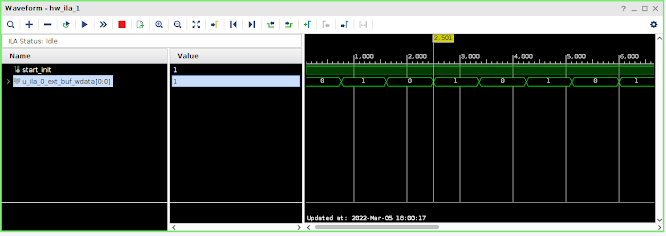
Inspecting a ILA waveform confirmed my theory:


This confirms that we are more or less on track. 

In Summary

In this post we played a bit with write levelling.

I was looking for something that could delay the DQS signal by small amounts. ODELAYE2 can do it, but is not an option on the Arty A7 because all DDR3 signals are connected to pins of an HR bank of the FPGA.

In the end I discovered that we can also achieve this delay via dynamic phase shifting provided by a MMCM.

Observations confirmed that write levelling can work by making use of an MMCM.

In the next post I will continue to experiment with write levelling and read levelling.

Till next time!

Tuesday, 22 February 2022

Diving into an Opensource Memory Controller

Foreword

In the previous post I gave a quick run down of initials perceptions of the Arty A7 board in getting memory access to work.

The Memory Interface Generator (MIG) provided by Vivado is very easy to use to create blocks for interfacing with the memory on the Arty board. However, no matter how much I tweaked the MIG generated code, I couldn't get to a design with minimal latency.

I started looking into alternative opensource Memory Controller designs, with the hope of getting around this latency issue.

One of the opensource designs I have looked into in the previous post, was a ddr3 design by Ultraembedded on Github. This is a very simplistic design, but also have latency issues.

In this post I will look into another Opensource memory controller, which is provided on Github by the Elphel camera project.

The Elphel Camera project is quite a project of note, of which the DDR3 memory controller forms just one component of it. So, in order to understand the surrounding context of their memory controller, I will start at a very high level, explaining what the Elphel camera project is about, and then gradually zoom into the memory controller itself.

About Elphel Inc.

Elphel Inc. is a company that produces opensource digital cameras. It uses lenses and Image sensors from other manufacturers. These cameras processes the images from the image sensors and produces JPGs using an FPGA and a CPU. 

One of the notable customers for Elphel cameras was Google Street View. I am sure many people have seen a vehicle like this in their neighbourhood the past decade or so, which was used to capture the footage for Google Street View:


The spherical ball on top contains a couple of cameras pointing in different directions. Many of these balls contained Elphel cameras in the past. The interesting thing is that the hosted FPGA/CPU within the Elphel setup can handle a couple of image sensors simultaneously, where each sensor can be 5MP or higher. These cameras can capture a number of frames a second, convert it to JPG's and store it to a SATA hard drive. 

Through the years Elphel produced different camera models, with their most recent models using a SoC that contains both a CPU and an FPGA: The Xilinx Zynq 7030 SoC. This is the big brother of the Zynq 7010, which is used in the Zybo board.

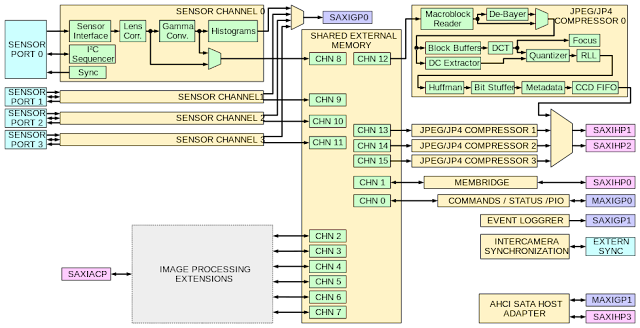
Let us have a quick look at the block diagram for the 10393:


You will note that both the FPGA and the ARM core has its own RAM. As you have seen in my C64 series on the Zybo, you have seen that it is possible for the FPGA to also access the RAM used by the ARM CPU. However, in the case of the 10393 the memory access patterns is quite unique, and for that reason they have decided to give the FPGA access to its own RAM.

On Elphel's web site there is a very interesting blog post in all the thoughts that went into designing the FPGA memory controller:

https://www.elphel.com/www3/node/355

The nice thing here is that the FPGA embedded in the Zynq 7030, and the FPGA on the Arty A7 is from the same FPGA family, so it should be easy to use the 10393 memory controller on our Arty A7 board. However, as you will see later there is some minor tweaks we need to do to make it work on the Arty.

Focusing on the 10393 memory controller

Let us now focus on the 10393 memory controller. First of all, here is the link to the source code for the 10393:

https://github.com/Elphel/x393

The following diagram they provide gives a quick overview on how the components fit together:


Shared External Memory is basically the memory controller, providing various channels for peripherals that need access to memory. The image sensors use channels 8, 9, 10 and 11 for writing image data to memory.

The blocks creating JPEGs for every sensor, uses channel 12, 13, 14 and 15 for reading from memory. Something interesting about these blocks is that they write the resulting JPEGs to the ports SAXIHP1 and SAXIHP2. These ports will ensure that this information ends up in the RAM to which the ARM CPU has access to, so that the JPEGs can be written to an SATA hard drive.

Looking at the code, it is quite difficult to figure out at first glance how the memory controller works. However, I have found it helps if you initially only focus on these files:

  • memctrl/mcntrl393.v
  • memctrl/memctrl16.v
  • memctrl/phy/mcontr_sequencer.v
  • memctrl/phy/phy_cmd.v
  • memctrl/phy/phy_top.v
Here mcntrl393.v is the top level module of the memory controller and the rest of the list is order by module level, so phy_top.v is the lowest level module.

Even with narrowing down to a handful of files, there is still a lot going onπŸ˜€. So, I will try and not be pedantic and just focus on what is required.

More on the DDR3 protocol

Before we get to see how we are going get the 10393 memory controller working on a Arty A7, let us familiarise ourselves a bit with the DDR3 protocol. This background information will help when we need to troubleshoot later on.

On a DDR3 RAM chip, you have the following signals:
  • Address
  • Cas - Column select
  • Ras - Row select
  • We - write enable
  • DQ - data
  • DQS - data strobe
  • Command clock
There is other signals on DDR3 chips as well, but for simplicity of this discussion, I am only showing these.

For anyone that is familiar with the RAM of a Retro gaming system, like the C64, many of the above signals will look familiar. For instance, on the C64 we know that in order to read from memory we first need to provide a row address, with the Ras signal asserted, and then  we need to provide a column address with the Cas line asserted. After some time, while the CAS line is asserted, the data will be available on the data lines.

As you can see from my description above, there is not really an exact times defined for when each of these steps should be performed. Luckily the manufactures of these RAM did provide for quite some headroom for timing errors.

However, throughout the years manufacturers tried pushing the data rate of RAM chips higher and higher, causing the headroom for timings errors to shrank drastically. To get around this increasing tight fit, it was necessary to introduce some clocking for both the commands and the data. For this reason there is a command clock and a DQS (Data Strobe) signal.

Another limitation when increasing the data rate is impedance and trace length, especially when you have multiple memory modules. The memory modules the furthest away from the memory controller will receive the controller signals (e.g. Cas, Ras, We, Command clock) later than the closer ones, causing clock skew.

In DDR3 we have the capability to compensate for these clock skew by delaying the DQS signal for each byte lane, so that it matches the Command Clock. The process of determining the amount of compensation required is called Write levelling and read levelling.

Let us have a quick look at how Write levelling work. We will look at read levelling in a later post.

With write levelling the DDR3 memory chip needs to placed first in write levelling mode. This is done by setting a register within the DDR3 memory chip.

During this mode the memory controller needs to toggle the DQS signal. However, during this mode the DDR3 memory chip uses the DQS signal in a totally different way than in normal mode of operation. In this mode, during the rising edge of the DQS signal, the memory chip samples the command clock and out the result on the lowest bit of the DQ bus. The purpose is that a '1' is eventually outputted on the DQ bus. If this is not the case, the DQS signal needs to be increasingly delayed in small steps, until a '1' is output to the DQ bus.

In Summary

In this post we have started to look into the memory controller provided by the Elphel Camera project especially from their 10393 camera model.

We also looked very briefly into the DDR3 protocol.

In the next post we will start to try and get this memory controller to work on the Arty A7 board.

As a first step, we will try and get write levelling to work, adjusting the DQS signal until we get a '1' on the DQ bus.

Till next time!

Saturday, 12 February 2022

Initial steps with the Arty A7

Foreword

Hi All! It has been quite a while since my last post.

In my last post I was the bearer of bad news regarding getting an Amiga core to run on a Zybo FPGA, because the effective latency of the DDR RAM was just too much.

In the previous post I also hinted that the direction I want to take to solve this latency issue, was to use an FPGA board that can give us raw access to DDR RAM. The board I have earmarked for this exercise is the Arty A7.

In this post I will give some feedback on my initial findings on using the Arty A7 board.

Initial Impressions

Having previously worked with the Zybo quite a bit, I got quite accustomed to the building blocks the Zynq SoC provides you out the box. On the Zynq there are two ARM cores, which you can write software to perform the non-time-critical functionality, easing your brain a bit on thinking how to implement it in the FPGA. Also, accessing RAM in the FPGA of the Zynq is also fairly straightforward.

Lastly, the Zynq also provides a number of onboard peripherals, like USB, I2C which you also program in software, once again simplifying your FPGA design.

When turning to the Arty A7, it feels initially like you are handed a blank canvas. You handed a bunch of logic elements, but no ARM cores, no DDR RAM controller and no on chip peripherals. Here I must give some credit to Vivado, that does provide you some wizards that can generate some of the building blocks that the Zynq provide. However, these generated blocks do eat into your available elements in the FPGA. 

Let us have a quick look at some of the wizards provided in Vivado. One of the wizards will create a MicroBlaze CPU core for you. This is a CPU core created by Xilinx which you are free to use within Vivado.

Another Wizard that Vivado provides is the MIG (Memory Interface Generator) Wizard. As the name suggests, this provides you an interface for communicating with DDR RAM. One of the useful interfaces that MIG provides is an AXI interface. AXI is also the interface that is used between Peripherals and the FPGA in the Zynq chip.

The MicroBlaze processor also supports the AXI interface, so in effect it is easy for the MicroBlaze processor to access DDR RAM via the generated MIG memory interface.

As you might have gathered, I will be putting all my efforts into understanding the design the MIG will generate πŸ˜€ , obviously trying to limit memory latency as much as possible, so that it is usable in an Amiga design.

My experience with a MIG design

I have found that using the MIG wizard is relatively painless, and your FPGA design can have access to the onboard DDR3 RAM in no time.

However, with the MIG generated design I was faced once again with too much memory latency. I was convinced that AXI might be adding some extra latency, so I trying to see if the MIG does provide an alternative interface.

Indeed, I found in the MIG documentation that that the MIG does provide a native interface. Just by its name 'native interface', I was optimistic that I am up for minimal memory latency. Too my dismay, I found that the native MIG interface yielded no latency improvement πŸ˜•

It was time to bring the butcher knife and trying to butcher the generated MIG Verilog code, trying to find and ripping out any pipelining code that can potentially add to the latency.

Trying to customise the code generated by the MIG is also a story for another day. In Vivado, most of the generated code is read-only, so the only real way to edit it is to take all the generated source files and add it to a new project that is not MIG aware. In this process you also need to remember to move over all the necessary constraints.

After some pain, I got to a point where I could customise a generated MIG design. This allowed me to hunt down in the design where the latency is happening. The bad news was that the component causing the latency was a close source component, very tightly knitted in the MIG design. So, unfortunately it was not a case of throwing this component out and replacing with a different component.

So, in short it didn't seem possible to tweak a MIG design up to a point where you have minimised latency.

However, the whole exercise with  MIG wasn't a waste. One of the useful outputs from the MIG process is all the necessary constraints, like the pins of the FPGA that is connected to the DDR RAM chip.

Investigating alternative designs

With the bit of a dead end I have reached with the MIG, I started looking around for Memory Controller designs on the Internet, that is open source. In this process I did found a couple of possible candidates which I will discuss in the next post.

Out of interest, I will share a solution that looked very simple and promising on Github:

https://github.com/ultraembedded/core_ddr3_controller

The nice thing about this core is that it also designed to run on the Arty A7. The downside of this core is again its latency, which gave it a maximum throughput of 5MHz.

In Summary

In this post I gave my initial findings on the Arty A7 board.

I also gave a broad outline of the detours I took to attempt to get to a memory controller design with minimal latency. Unfortunately, I wasn't able in this post to get a solution.

In the next post we will look into another open source memory controller available on Github, that have some merit for what we want to achieve.

In the next post, I will also be covering details about the DDR3 protocol.

Till next time!